
User Research
User Testing
Redesign
Prototyping
Data Tables
Heuristic Analysis
Research Data Commons (RDC)
Redesigned complex scientific data easier to find, explore, and access through UX research, usability testing, and accessibility-focused design.

Date
May 2024
Role
UX Designer and Researcher
Teams
Informatics & Predictive Sciences
Testing
7 Scientists
Overview
Lack of Design caused missed opportunities for discovering scientific breakthroughs.
BMS generates vast amounts of scientific data and information across various stages of research and development. Managing, organizing, and enabling findability & accessibility of this data is complex and time consuming. Data, in addition, lives in siloes and BMS lacks a centralized platform.
The platform that scientists use in the Informatics and Predictive Sciences unit is developed but not designed. Users cited several issues like visibility of filters, not being able to save/load filters as well as proper organization of details. "Nice to have" features such as dark mode were also mentioned. Furthermore, the difficult data siloed data structure requires data visualization to be unambiguous, precise and to take up much less cognitive load in users.
Every core user function had usability and accessibility issues with some beneficial functions unfindable. Moreover, the platform does not look like a BMS product.

This unformatted data table has a filter panel that's hard to navigate, lets users add columns requiring horizontal scroll and has infinite scroll.

This filter panel requires alot of scrolling, needs too much expanding and has no clear way to show users what they already selected.

Searching in the card view for biospecimens autoloads upon typing. It also does not highlight searched terms in the results.

File Organization in the details is not intuitive - it doesn't show hierarchy in the nesting.

Home Page has mismatching icons in the nav and above the search. Some of it is redundant.

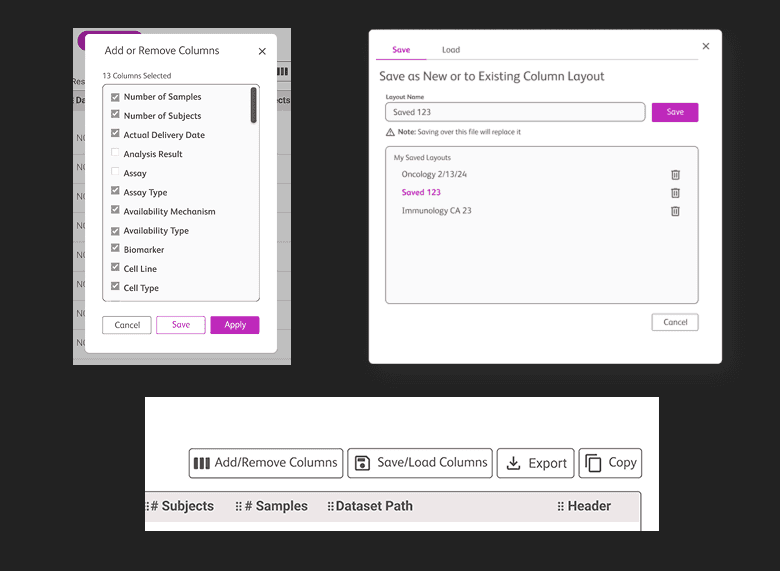
Cumbersome selection of columns requires expanding and checkg or unchecking each one. Scrolling in a subwindow is not ideal and there is no way to save column layouts.
Process
Using the Double Diamond Approach to reduce Cognitive Load
Lasting over two and a half months, this engagement conducted regular checkpoints with our stakeholders and ended with a readout.
01
Discover
Stakeholder Interviews
Product Walkthroughs
User Flows
02
Define
Heuristic Analysis
Defining which parts of the platform and which user flows fall within scope given our timeline and budget
Organizing via Miro
03
Prototype
Use synthesized data to inform design decisions
Iterations for wireframes before creating clickable prototype in Figma
04
Test
Recruitment of 5 principal scientists in the predictive analytics department
Moderated testing of MVP via UserZoom
00
Accessibility Review
Accessibility Review was conducted by our team's accessibility manager in parallel to our workflow. His findings were at the code level. Consultations between us helped clarify key user and product challenges while providing a clear foundation for development.
Deliverables
Click the buttons to scan the deliverables. Heuristic Analysis and weekly checkpoints are not included
Full Clickable Flow
Full Flow
Accessibility Annotations
UI Kit

Wireframes with clickable prototype showing core functions
Outcome
The redesign improved productivity and data access, informed future product strategy and embedded accessibility - all while reducing development risk.
Our stakeholders at the predictive sciences department were very satisfied with our engagement
Improved User Productivity and Efficiency
The redesign streamlined navigation and search, reducing search time and enabling faster access to data, which boosted user satisfaction, accelerated decision-making, and enhanced overall operational efficiency.
00
Informed Product Strategy
Our research and usability testing provided insights that informed broader strategic decisions for future development. The findings helped the team prioritize high-severity issues for future iterations and set the foundation for post-MVP development. Accessibility and user-centric design are now being incorporated as foundational principles, shaping the long-term direction of the RDC platform.
00
Reduced Developmental Risk
Identifying key usability and discoverability issues early prevented costly rework and ensured that the redesign addressed core user needs from the start.
00
Broadened Accessibility
Our engagement heightened the Research and Development team’s awareness of accessibility standards and best practices. Stakeholders now plan to integrate accessibility considerations into the initial designs of future products.
00
Timeline Efficiency
By choosing a heuristic evaluation over a full usability test early on, we met the tight project deadlines and allowed developers to begin their work on the ‘Dataset Exploration Flow’ without delay.
Redesign
All 7 Participants Tested on UserZoom Preferred the Redesign
After the redesign, users were asked to test the new prototype and they were thrilled (one even said "yayy!!") to see the new system.
Some of the redesigned screens are shown below. Scroll though redesigns and tab to see changes in detail


Stakeholder Quote
Stakeholder Quote
“Working with the Enterprise Accessibility and UX team has been an absolute pleasure. Their deep expertise in user research and accessibility was evident in every stage of the project. The final deliverable not only exceeded our expectations in terms of quality, but also made a significant impact on our product, enhancing both usability and accessibility. What stood out most was their collaborative approach—communication was always clear, and the project plan was executed seamlessly. I highly recommend them to anyone looking to elevate their product’s user experience.”
Senior Data Product Manager, Informatics & Predictive Sciences